


Information Technology
Course Overview
Key benefits
- Higher Engagement and Retention – Interactive sessions encourage active participation, enabling learners to ask questions and solve real-time problems while providing immediate feedback on hands-on activities.
- Faster Skill Development – Concentrated learning over a set timeframe provides accelerated upskilling with clear objectives and milestones ensure rapid progress. Information Technology
- Team Collaboration – Team members collaborate, share ideas, and align their understanding to drive organizational success thus promoting alignment across departments working on common goals.
💻 What Are Information Technology Fundamentals?
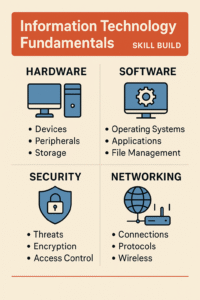
Information Technology Fundamentals introduce the core concepts and skills required to understand and work in the IT field. This knowledge serves as the foundation for careers in IT, cybersecurity, programming, cloud computing, and tech support.
It’s ideal for beginners, students, job switchers, or non-tech professionals looking to understand how computers and networks work.
🧠 Core Areas Covered
1. IT Concepts & Terminology
-
Basics of computing, data types, binary, and software vs hardware
-
Understanding the purpose of IT systems
-
Familiarity with emerging tech (AI, IoT, cloud)
2. Infrastructure
-
Computer components (CPU, RAM, storage types)
-
Input/output devices
-
How operating systems interact with hardware
3. Applications & Software
-
Types of software: productivity, collaboration, security
-
Software installation and troubleshooting
-
File management and extensions
4. Database Fundamentals
-
What databases are and why they’re used
-
Concepts like tables, records, fields, and queries
-
Basics of relational databases
5. Networking Concepts
-
LAN, WAN, the Internet, and intranets
-
IP addresses, DNS, routers, and switches
-
Wired vs wireless technologies
6. Cybersecurity Basics
-
Threats: malware, phishing, ransomware
-
Security practices: password policies, antivirus
-
Access control and encryption basics
7. Troubleshooting
-
Common IT support procedures
-
How to identify and fix basic hardware/software issues
-
Problem-solving methodology
🏅 Certifications (Optional but Useful)
-
CompTIA IT Fundamentals (ITF+) – globally recognized beginner cert
-
Google IT Support Certificate
-
Cisco IT Essentials (by Cisco Networking Academy)
🎯 Who Should Learn IT Fundamentals?
-
Students exploring IT or computer science careers
-
Professionals switching from non-technical roles
-
Entrepreneurs who need basic IT skills
-
Beginners preparing for advanced courses (cloud, cybersecurity, coding)
🛠️ Skills Gained
-
Confident use of OS like Windows, Linux, macOS
-
Basic troubleshooting of PCs and mobile devices
-
Understand how networks work
-
Safe and secure use of internet and applications
-
Foundation for learning coding, cybersecurity, or cloud
📚 Best Places to Learn Online
| Platform | Course Name | Cost |
|---|---|---|
| Coursera | Google IT Support | Free/Paid |
| Udemy | CompTIA ITF+ Complete Course | ₹500–₹1500 |
| LinkedIn Learn | IT Help Desk for Beginners | Free trial |
| edX | IT Fundamentals by WGU or IBM | Free/Paid |
| CompTIA | Official ITF+ Training | Paid |
📈 Next Step After Learning IT Fundamentals
Once you’re confident with the basics, you can branch into:
-
🧑💻 IT Support / Helpdesk
-
🔐 Cybersecurity
-
☁️ Cloud Computing
-
🧑💻 Programming
-
⚙️ Networking or DevOps
🔍 Detailed Topics Breakdown
🔧 1. Hardware
-
Components: CPU, RAM, SSD/HDD, GPU, motherboard
-
Peripherals: Mouse, keyboard, webcam, printer
-
Input/output ports: USB, HDMI, audio jack, Ethernet
-
BIOS/UEFI basics and hardware troubleshooting
🖥️ 2. Software
-
Operating Systems: Windows, Linux, macOS
-
Utilities & Tools: Disk Cleanup, Task Manager, Terminal/Command Prompt
-
Productivity Tools: Microsoft Office, Google Suite, Notion
-
Virtualization Basics: VirtualBox, VMware (for running multiple OS)
🌐 3. Networking (Expanded)
-
OSI Model (7 Layers Overview)
-
IP Addressing (IPv4 vs IPv6) Information Technology
-
Network Devices: Switch, Router, Firewall
-
Wireless Standards: 802.11 a/b/g/n/ac
-
Troubleshooting with
ping,tracert,ipconfig, etc.
🔐 4. Cybersecurity Essentials
-
Types of Attacks: DoS, phishing, social engineering
-
Protection Methods: Firewalls, antivirus, encryption (AES, RSA) Information Technology
-
Secure browsing (HTTPS, VPN)
-
User permissions and secure authentication (MFA, biometrics)
📊 5. Databases & Data Management
-
Understanding Tables, Fields, Primary Keys
-
CRUD Operations (Create, Read, Update, Delete)
-
SQL Basics
-
Cloud databases (Firebase, AWS RDS)
📁 6. File Systems and Storage
-
File types (.docx, .exe, .jpg, .zip, etc.) Information Technology
-
Local vs cloud storage (Google Drive, OneDrive)
-
Backups: Full, Incremental, Differential
-
Formatting drives (NTFS, FAT32, exFAT) Information Technology
🧭 IT Fundamentals Learning Roadmap
| Level | Skills & Tools | Outcome |
|---|---|---|
| 🟢 Beginner | Hardware basics, Windows OS, file mgmt | Confident PC usage |
| 🔵 Intermediate | Networking, security, troubleshooting | Ready for IT Support role |
| 🟣 Advanced | Virtualization, CLI tools, databases | Move to cloud/cybersec/programming |
🛠️ Popular Tools & Platforms You’ll Use
| Tool/Platform | Purpose |
|---|---|
| Windows OS/Linux | Operating system practice |
| VirtualBox | Create and manage virtual machines |
| Google Workspace | Productivity suite |
| Wireshark | Network packet analysis |
| Notepad++ / VS Code | Basic scripting & text editing |
| Command Line (CLI) | Run system/network commands |
🚀 Career & Further Learning Paths
| Track | Next Courses to Take | Example Job Titles |
|---|---|---|
| IT Support | Google IT Support, CompTIA A+ | IT Technician, Helpdesk Support |
| Cybersecurity | CompTIA Security+, CEH, IBM Cybersecurity | Security Analyst, SOC Engineer |
| Networking | CompTIA Network+, Cisco CCNA | Network Admin, Infrastructure Eng. |
| Cloud | AWS Cloud Practitioner, Azure Fundamentals | Cloud Support Engineer |
| Software Dev | HTML/CSS/JS, Python, Git, GitHub | Jr. Developer, QA Tester |
🧪 Mini Projects You Can Try
-
💻 Assemble and troubleshoot a desktop PC
-
🌐 Create a local area network and test connectivity
-
🔐 Make a password policy for a small company
-
🧱 Write a simple SQL database to store contacts. Information Technology
-
📦 Backup and restore data using OneDrive or Google Drive
🎓 Certification: CompTIA ITF+ (FC0-U61)
Exam Highlights:
-
75 multiple choice questions
-
Duration: 60 minutes
-
Passing score: 650 (on scale of 900)
-
Topics: IT concepts, infrastructure, apps, software, security, troubleshooting. Information Technology
Benefits:
-
Globally recognized
-
Excellent starting point for students or beginners
-
No prerequisites
🎁 Bonus Tips for Beginners
✅ Use free tier accounts for AWS, Azure, or Google Cloud
✅ Practice on virtual machines to avoid damaging your system
✅ Use Reddit (r/ITCareerQuestions) and YouTube for real-world advice
✅ Build a small home lab if possible (old PC + router)
 Previous Post
 Next Post